Visual Prompt Engineering

Build better prompts
visually

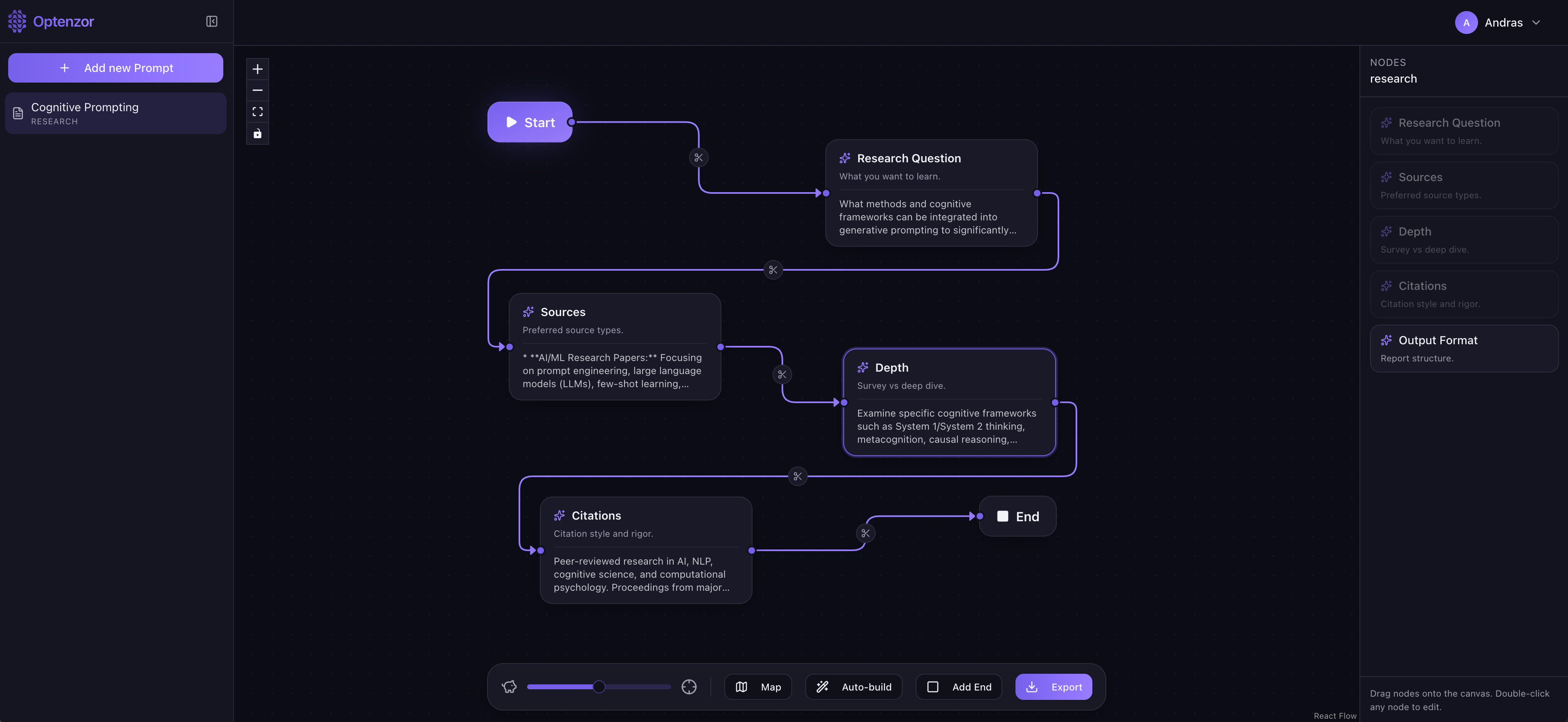
Drag, connect, and generate structured prompts for any AI workflow — from image generation to autonomous agents.

Optenzor — Visual Prompt Editor
Optenzor app — visual prompt canvas
What you can build

One editor for every prompt type

Each prompt type comes with its own set of purpose-built sections — no blank-page anxiety.

Generic
Universal structure for any LLM task.
Vibe Coding
Optimized for AI-assisted development prompts.
✍︎
Content Generation
Articles, copy, social, and long-form writing.
🖼
Image Generation
Visual style, subject, mood, and camera sections.
▶︎
Video Generation
Scene, motion, timing, and narrative structure.
⚙︎
Agent Design
Goals, tools, memory, and decision logic.
Data Analysis
Dataset context, analysis goals, and output format.
Research
Scope, methodology, sources, and depth controls.
How it works

A canvas built for prompt craft

Everything you need to compose, generate, and refine high-quality prompts — without writing from scratch.

⋮⋮
Drag & Drop Canvas
Assemble sections visually and connect them in the order that matters. Rearrange any time.
AI Section Generator
Generate any individual section with one click, or write it yourself — total flexibility.
Auto Build
Hit Auto Build and let Optenzor generate the complete prompt end-to-end instantly.
Export as TXT
Export any finished prompt as a clean TXT file, ready to paste anywhere.
BYOAI Structure
Bring your own AI — Optenzor structures the prompt. You choose where to use it.
Prompt Library
Save and revisit past prompts. Your best work, always within reach. (Pro)
Who it's for

Built for anyone who talks to AI

If you've ever stared at a blank prompt box and thought "I know what I want but don't know how to say it" — Optenzor is for you.

⌨️
Developers & Vibe Coders
Tired of repeating your stack in every coding prompt? Set it once in the canvas — preferred language, framework, patterns, constraints — and let Auto Build handle the rest. Every generated prompt inherits your rules.
✍️
Content Creators & Marketers
Go from idea to structured brief in seconds. Define your brand voice, audience, format, and tone visually — and generate on-brand copy, articles, and social posts that don't sound like generic AI output.
🎨
Designers & Visual Artists
Stop losing your aesthetic to vague descriptions. The Image Generation prompt type has dedicated sections for style, subject, lighting, camera, and mood — so your visual prompts are as precise as your eye.
🤖
AI Builders & Agent Designers
Designing an autonomous agent is complex. Optenzor's Agent Design type gives you structured sections for goals, tools, memory, and constraints — turning a wall of instructions into a clear, maintainable blueprint.
🔬
Researchers & Analysts
Define scope, methodology, source constraints, and output format before a single word is generated. The Research and Data Analysis types make prompts reproducible — a critical need when results need to be cited or shared.
🚀
Teams & Small Businesses
Standardise how your team interacts with AI. With custom system prompts (Pro), every team member generates output that follows the same voice, rules, and brand guidelines — without a prompt-engineering specialist on staff.
Bring Your Own AI

Your keys. Your models. Your rules.

Optenzor is model-agnostic by design. Paste your own API key from any supported provider and the generation engine powers up instantly — no subscriptions locked to a single model vendor.

🔑

How it works: In Optenzor's settings, you'll find an API Keys panel. Paste your key from any provider below and select it as your active engine. Every section generation and Auto Build call will route through your own key — Optenzor never stores or proxies your credentials beyond your session. All six providers below offer free tiers or can be run fully locally at no cost.

Google Gemini Free tier

Gemini Flash models are among the fastest free options available, with a generous daily quota via Google AI Studio.

  1. 1Go to Google AI Studio and sign in with your Google account.
  2. 2Click Get API keyCreate API key in new project.
  3. 3Copy the key and paste it into Optenzor's API Keys panel.
Get API key
Groq Free tier

Groq offers blazing-fast inference on open models (Llama 3, Mixtral) with a free tier that resets daily — ideal for rapid prompt iteration.

  1. 1Sign up at console.groq.com.
  2. 2Navigate to API Keys and click Create API Key.
  3. 3Copy and paste the key into Optenzor.
Get API key
OpenRouter Free models

OpenRouter is a unified gateway to 200+ models. Many models are permanently free; a single key unlocks them all including GPT-4o, Claude, and Gemini.

  1. 1Register at openrouter.ai and verify your email.
  2. 2Go to Keys and create a new key (no credit card required for free models).
  3. 3Paste the key into Optenzor and pick a free model.
Get API key
Ollama Runs locally

Ollama lets you run open-source models (Llama 3, Mistral, Gemma…) entirely on your own machine — no internet, no costs, complete privacy.

  1. 1Download and install Ollama from ollama.com.
  2. 2Run ollama pull llama3 in your terminal.
  3. 3In Optenzor, set the provider to Ollama (uses localhost:11434 — no key needed).
Download Ollama
Cerebras Free tier

Cerebras delivers exceptionally fast inference on Llama models using custom wafer-scale silicon. Free tier included with sign-up.

  1. 1Sign up at cloud.cerebras.ai.
  2. 2Go to API Keys in your dashboard and generate a key.
  3. 3Paste it into Optenzor's API Keys panel.
Get API key
Mistral AI Free tier

Mistral's own models (Mistral 7B, Mixtral 8x7B, Mistral Small) are available via their API with a free experimental tier on sign-up.

  1. 1Create an account at console.mistral.ai.
  2. 2Navigate to API Keys and click Create new key.
  3. 3Copy the key and add it to Optenzor.
Get API key

The providers above are just a starting point. The AI landscape is evolving fast — new free tiers, research credits, and open-access programs appear regularly from providers like Cohere, Together AI, Hugging Face, and others. If your preferred model offers an OpenAI-compatible API endpoint, chances are it works with Optenzor too.

Own the instructions
behind every prompt

Pro only

Every AI model responds to a hidden layer of instructions before your prompt even begins — the system prompt. By default, these are fixed. With Optenzor Pro, you can edit them per prompt type, bending each workflow to your exact standards.

Think of it as setting the context, personality, and ground rules for every session in advance. The right system prompt can turn a generic output into something that sounds like it came from your team — not just any AI.

Vibe Coding
Enforce your stack, always
Add a system prompt that instructs the model to only suggest TypeScript, avoid class components, and always include error boundaries. Every vibe coding prompt you generate inherits these rules automatically.
Content Generation
Lock in your brand voice
Define your tone, vocabulary, and off-limits phrases once. Whether you're generating a tweet or a 2,000-word article, every output reflects your brand — without repeating yourself in every prompt.
Image Generation
Set a permanent visual style
Preload your preferred aesthetic — "cinematic, shot on 35mm, muted tones, no AI-gloss" — into the system prompt so your image prompts never drift into generic territory.
Agent Design
Pre-define safety and scope
Set boundaries and behavioral rules at the system level so every agent prompt you build inherits the right constraints from the start — reducing hallucinations and scope creep.

Start free, scale when ready

No credit card required to get started.

Free
$0 / forever
Perfect for trying Optenzor out.
  • 4 prompts per month
  • All 8 prompt types
  • Drag & drop canvas
  • Export as TXT
Sign up free
FAQ

Common questions

Everything you need to know before you start.

Yes. Optenzor itself has no paywall to get started. The AI generation uses your own API key — many providers (Gemini, Groq, OpenRouter) offer generous free tiers with no credit card required. You pay the provider directly, and only if you exceed their free quota.
Bring Your Own AI. Optenzor handles the prompt structure and the visual editing experience — you supply the AI horsepower via an API key from the provider of your choice. This means you're never locked to a single vendor, and you choose the model that best fits your task and budget.
No. Your API keys are never stored on Optenzor's servers or proxied through them. They live in your browser session and are sent directly from your browser to the AI provider. When you close your session, they're gone.
Currently Google Gemini, Groq, OpenRouter, Ollama (fully local), Cerebras, and Mistral. OpenRouter alone unlocks access to 200+ models including GPT-4o, Claude, and Llama. Any provider with an OpenAI-compatible API endpoint is also supported, which covers a large and growing part of the AI ecosystem.
A system prompt is a layer of hidden instructions the AI receives before your main prompt. It sets personality, rules, and context. With Optenzor Pro you can customise the system prompt per prompt type — for example, locking your coding prompts to TypeScript, or your content prompts to your brand voice — so you never have to repeat those instructions again.
Yes, via Ollama. Install Ollama on your machine, pull any open-source model (Llama 3, Mistral, Gemma…), and set Optenzor's provider to Ollama. Everything runs locally — no internet required for generation, no data leaves your machine, and there are no API costs whatsoever.
The free plan lets you build and export prompts using all 8 prompt types. Pro adds unlimited prompt generation, a saved prompt library, and the ability to customise system prompts per prompt type. The app is intentionally generous on the free tier — Pro is for power users who want to build a permanent library and enforce standards across their workflow.

Get in touch

Have a question, ran into an issue, or want to share feedback? We're a small team and we read every message. Fill in the form below and we'll get back to you as soon as we can.